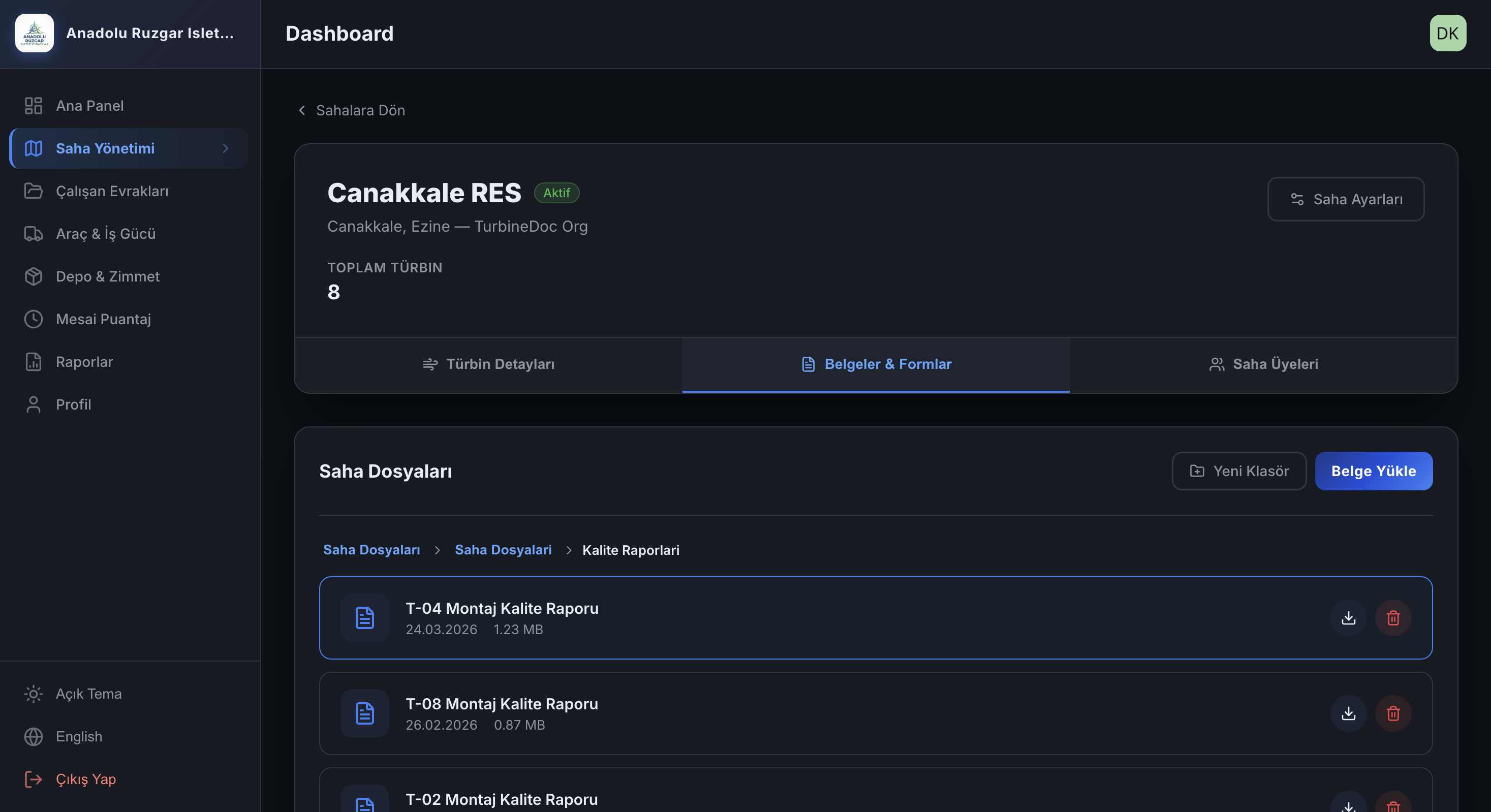
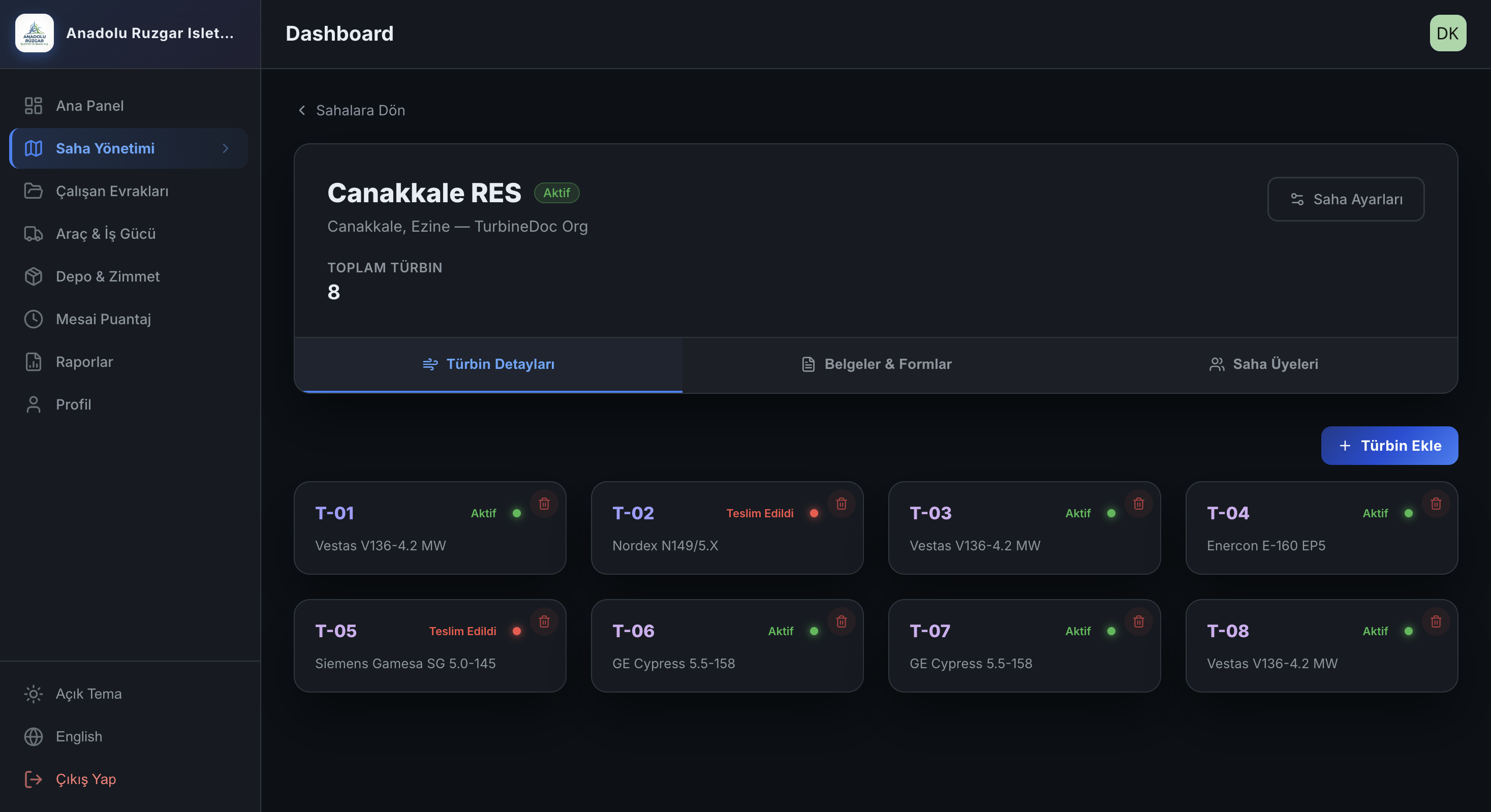
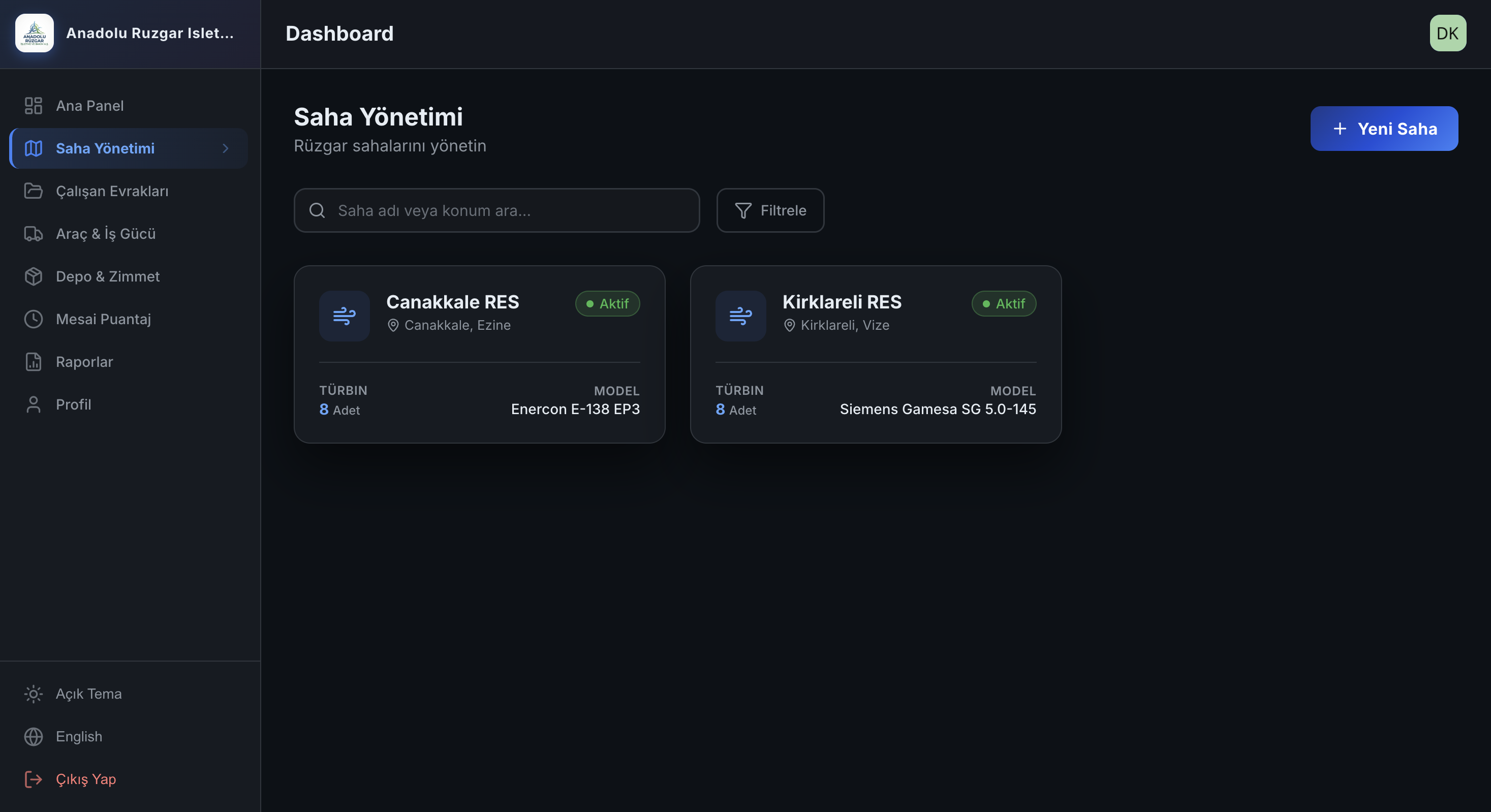
Available on App Store & Google Play

Site Management
with TurbineDoc

Task tracking, timesheet, vehicle & equipment management, and reporting for RES construction, maintenance, and O&M operations — web panel and mobile app, offline-first, on a single platform.

TurbineDoc Web Panel
Mobile Task
4 Languages Turkish, English, German, and Chinese — compatible interface and report structure.
5 Roles Project manager, site manager, HSE, team leader, and technician — permission structure aligned with the operations chain.
Single Flow Tasks, comments, documents, assignments, and timesheets are all consolidated on one platform.
Offline-First Data keeps flowing even when the connection drops; it syncs when the signal returns.
The Real Problem in the Field

The problem is rarely technical —
it’s scattered information.

Disruptions at wind sites mostly don’t come from a lack of task lists, but from messaging, timesheets, documents, and assignment processes living in different places.

Operations trapped in WhatsApp

Decision notes, status updates, and field progress scatter across different chats; a week later, it’s unclear what was done and why.

In-task chat, comments, and gallery are kept in a single record.

Documents noticed on the last day

Employee papers, site forms, and compliance documents get lost between folders; expiry dates are caught too late by management.

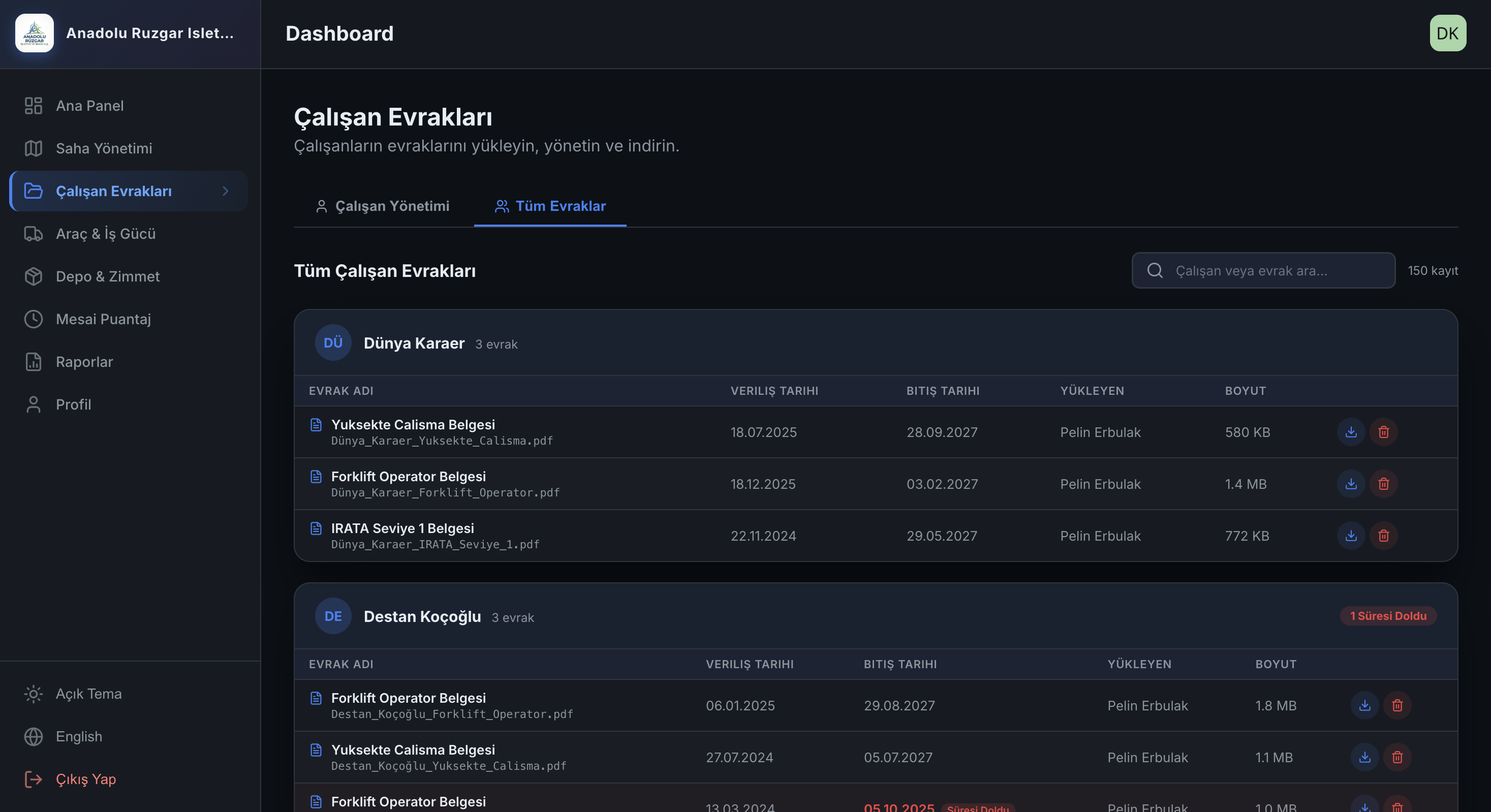
Employee documents are tracked by date, person, and file.

Timesheet and approval delays

When overtime, leave, and site entries are collected manually, errors increase; management makes decisions with late and incomplete data.

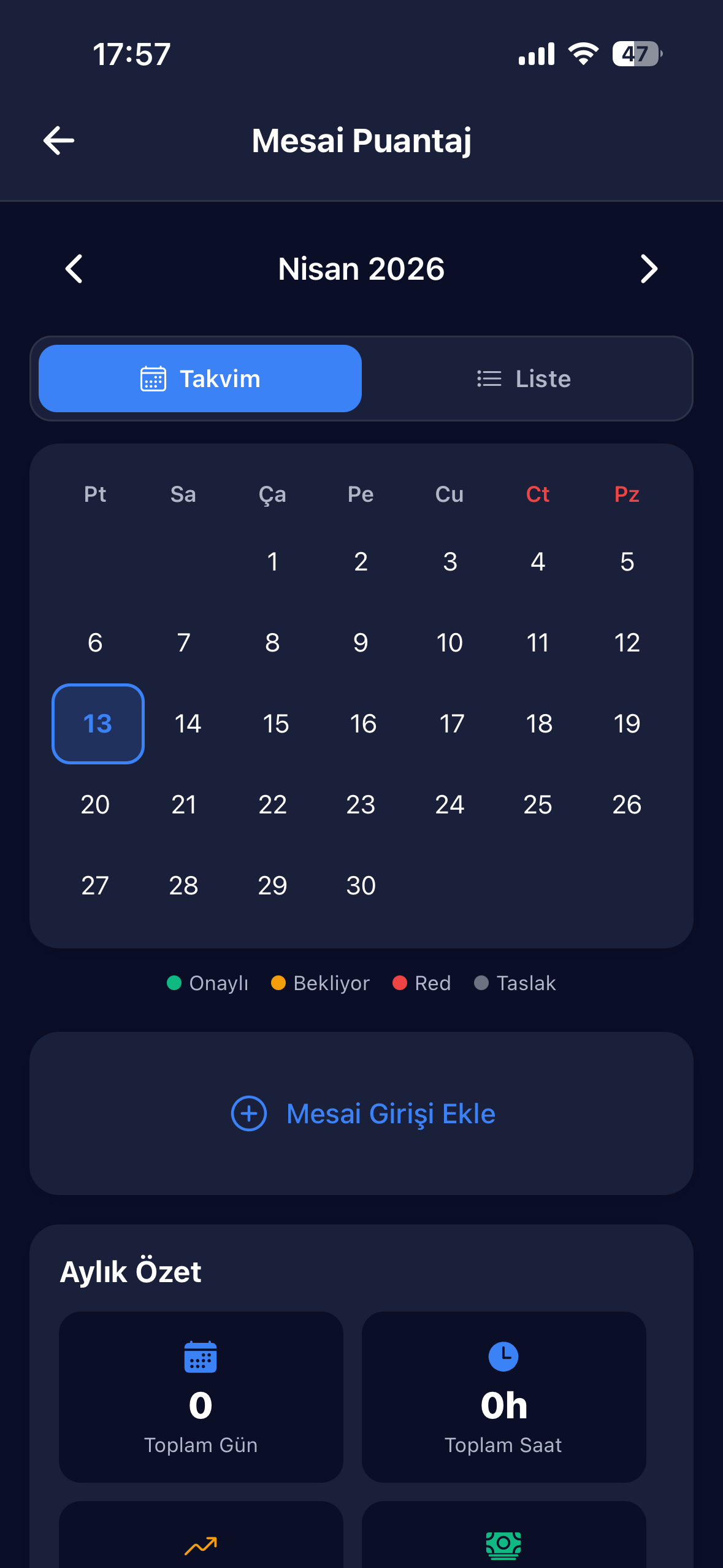
Mobile timesheet entry and role-based approval flow creates a standard.

Vehicle and equipment handover disputes

When it’s unclear who received what and when, with what notes, or when the next service is due, operations silently accumulate risk.

Mileage, handover notes, inspection, assignment, and calibration history stay in one place.

Work stopping when there’s no connection

In the field, internet isn’t always strong. If data entry also cuts out when the signal does, the system — not the person — grows the error cost.

An offline-first architecture keeps field operations independent of signal quality.
Product Architecture

TurbineDoc operates in three layers:
manage, execute, prove.

Not just a mobile app or just a panel. Management visibility, field execution speed, and retroactive audit trail were designed together within the same product.

🖥️ Web control room

The management panel brings sites, turbines, active tasks, vehicle cards, reports, and employee documents together in one centre.

Quick access to site and task summaries via dashboard Manage vehicle, warehouse, document, and report modules from one menu Centralised, up-to-date operational visibility for multi-site teams

📱 Mobile field app

Field teams run their daily plans, tasks, chats, timesheets, documents, and equipment flows directly from the field.

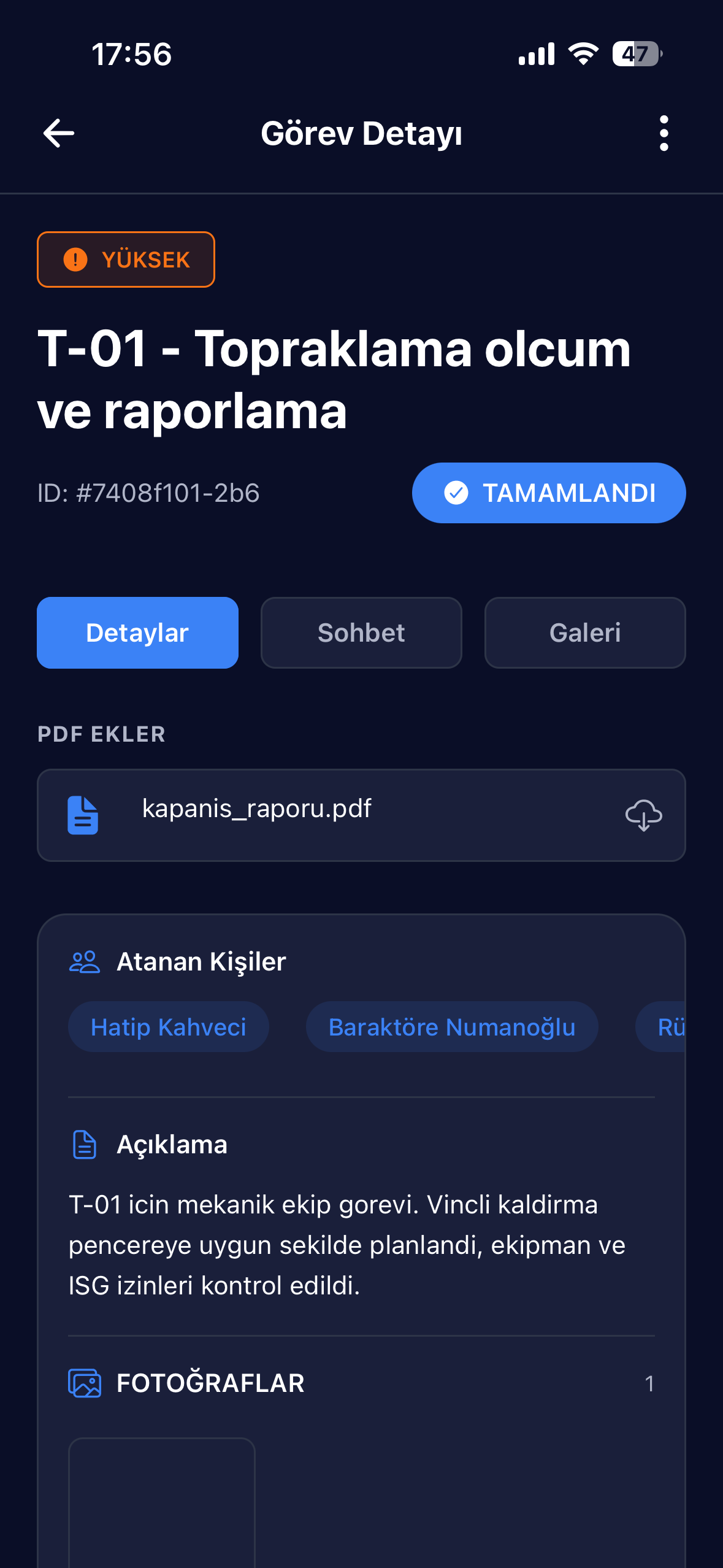
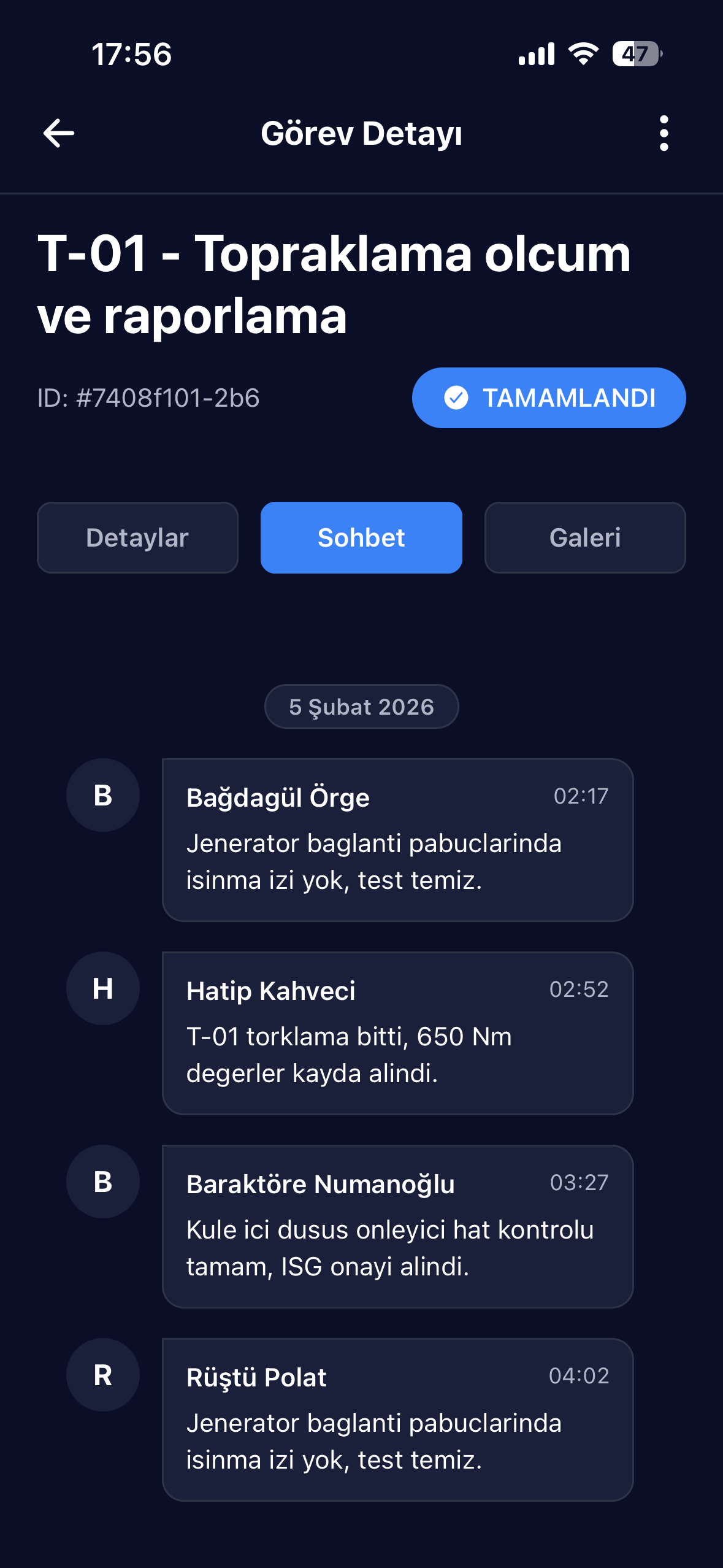
Task details, comments, and gallery in one mobile screen Search, quick entry, and site-specific document access Offline-first infrastructure for a usable experience even with weak connectivity

🔐 Compliance and audit layer

The trust logic running in the background doesn’t just collect operational data — it makes it defensible in retrospect.

Controlled usage with role-based access and audit trails Time-limited file access and encrypted storage for sensitive areas Operational continuity through notifications, OTA updates, and error tracking
01

Plan

Define sites, turbines, teams, daily plans, and tasks from the centre.

02

Execute

Let field teams enter comments, photos, forms, timesheets, and flow data directly on mobile.

03

Prove

Handover notes, assignments, calibrations, and document dates remain as permanent records.

04

Report

Gain status visibility from the management panel, generate reports, and conduct retrospective reviews.

Modules

What’s sold isn’t an app —
it’s operational gaps being closed.

Think of each module not as a feature list, but in terms of which risk it closes and whose time it saves.

🏗️

Site & Turbine Management

Sites, turbine counts, daily plans, and active workloads are brought together in one view. An operational map forms for management.

📋

Task Flow & Chat

Details, chat, gallery, and closure trail live together inside the task card. Decision notes don’t get lost in phone messages.

📅

Daily Work Plan

Clarifies the turbine-based day flow and active workload distribution. Teams arrive knowing what they’re starting the day with.

🚗

Vehicle & Workforce

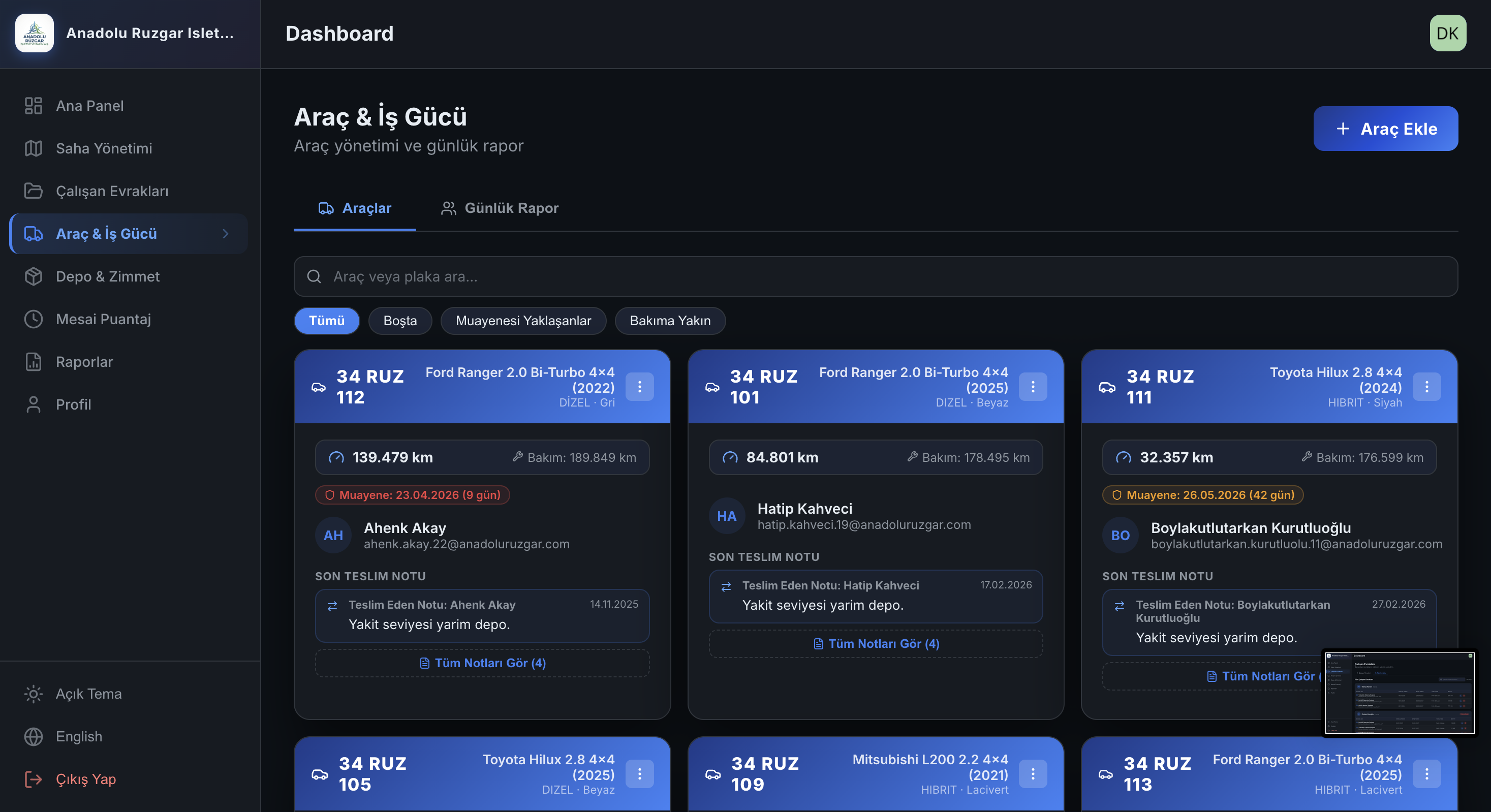
Vehicle cards, mileage, service, inspection, and handover notes all progress in the same module. Operational and administrative tracking stays connected.

🔧

Equipment & Calibration

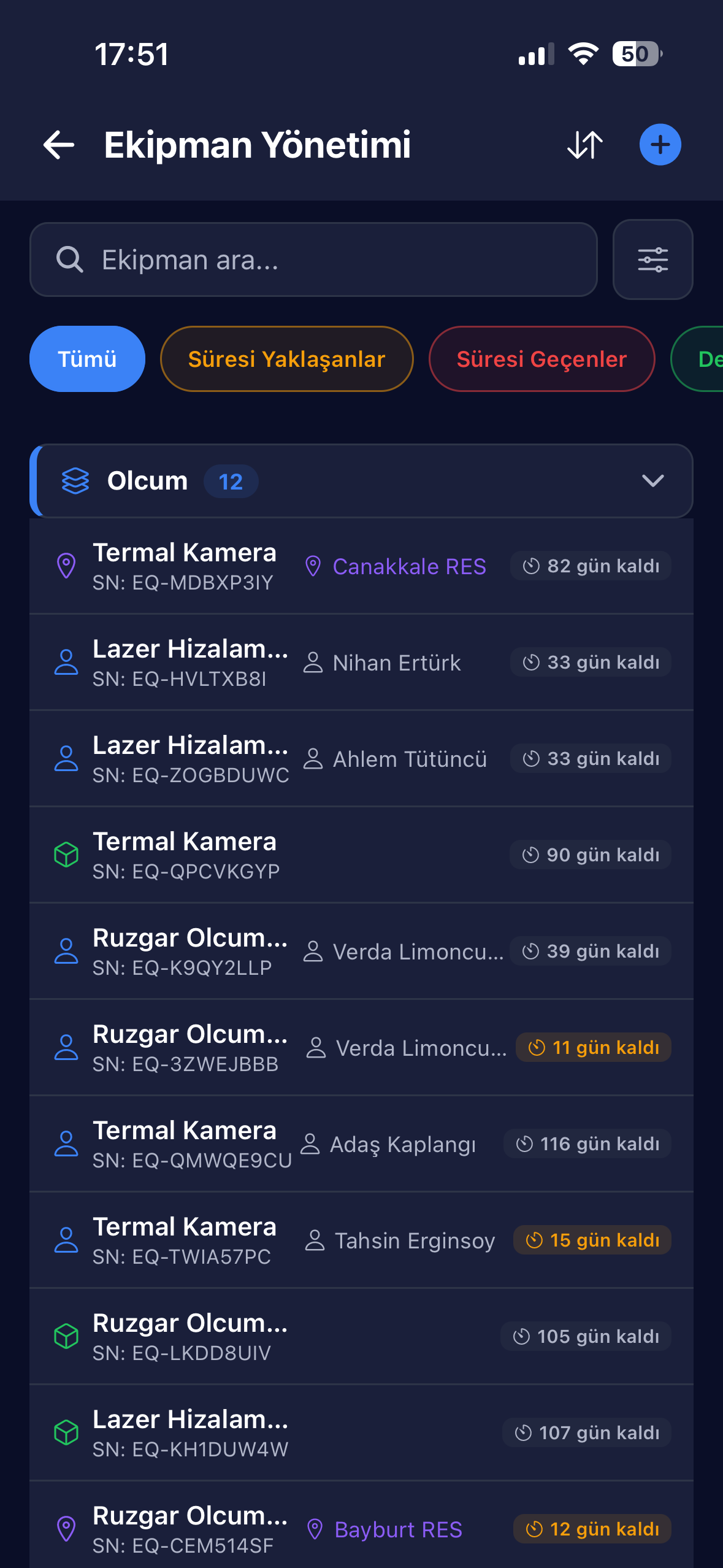
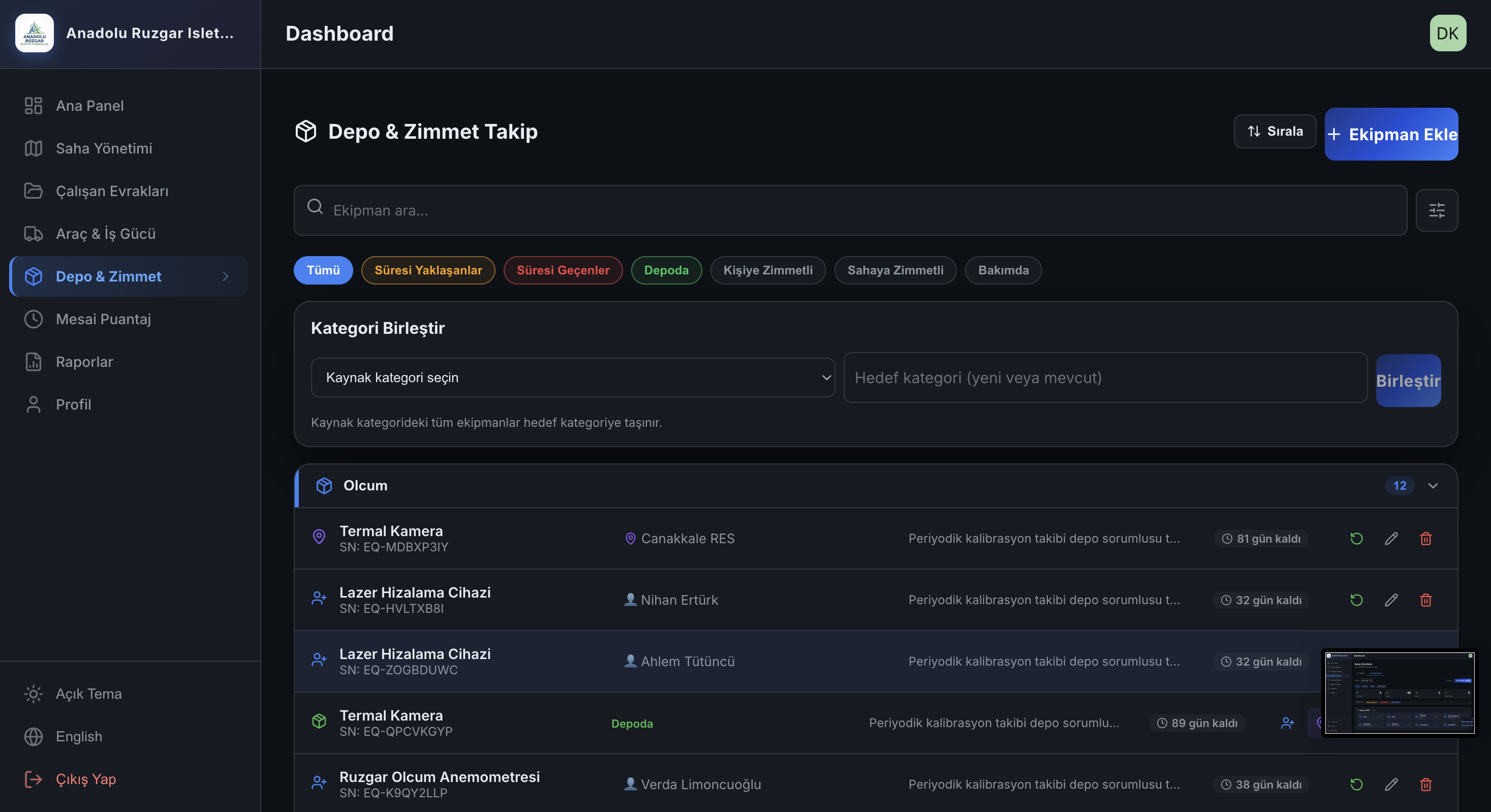
With serial number, assignment status, and calibration countdown, critical equipment is no longer a blind spot. Items approaching expiry become visible early.

🕐

Timesheet & Overtime Approval

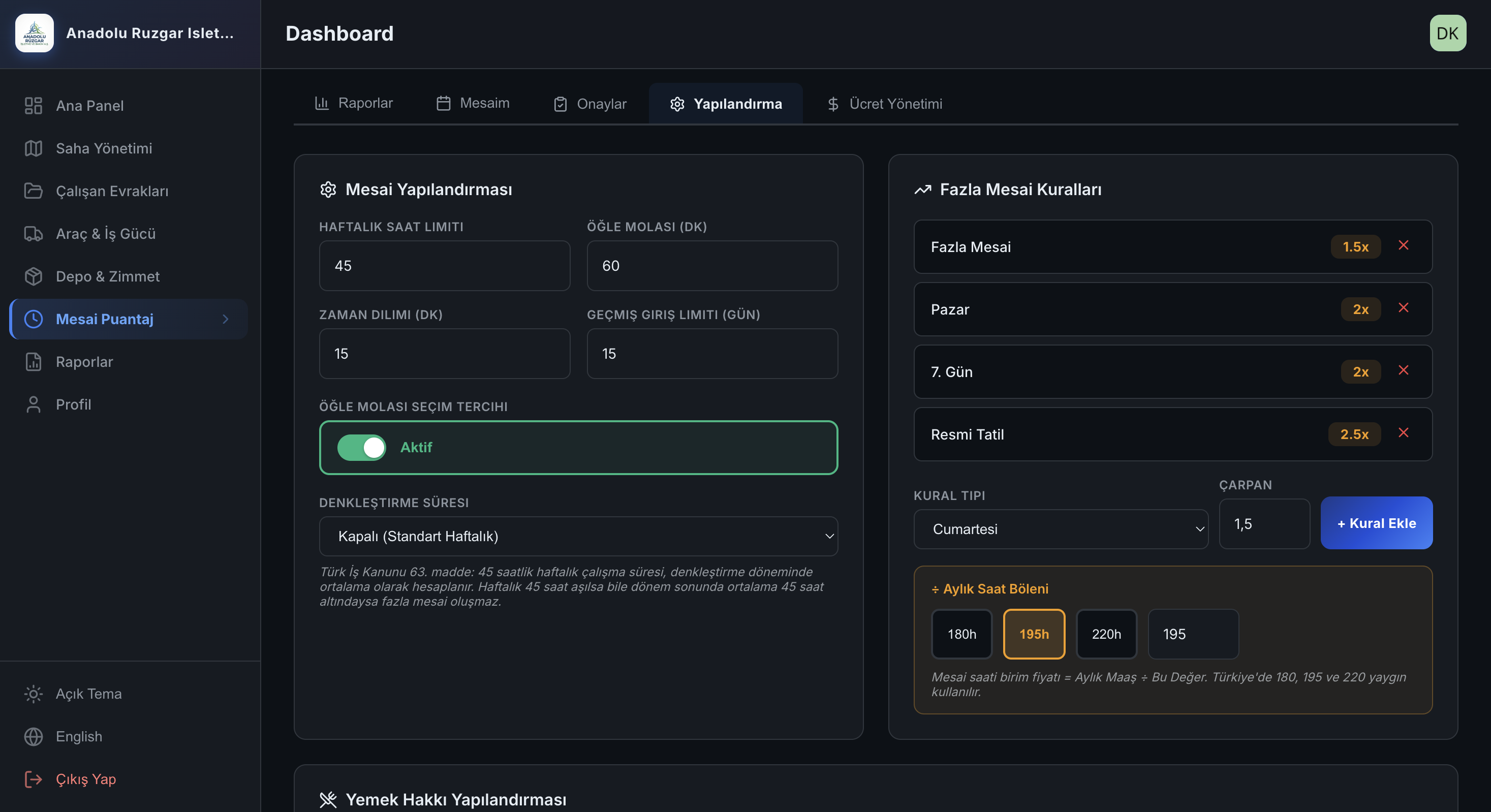
Mobile entry, shift and leave items let timesheets flow from the field to the centre in a standard format. Role-based approval chains speed up decisions.

📁

Employee Documents

Issue date, expiry, uploader, and file record are tracked in the same table. Expired documents don’t create last-minute surprises.

📂

Site Documents & Forms

Instructions, forms, and site documents remain accessible with organised folder logic; teams don’t search in the field.

📊

Reporting & Multi-Language

Operations and backlog reports can be generated for different periods. International compliance through TR, EN, DE, and CN support.

🔔

Notifications & OTA Update

Push notifications and a fast release pipeline let the app reach the field more nimbly. Teams aren’t left uninformed at critical moments.

🔐

Permissions, Audit & Security

Role levels, audit records, and encrypted storage for sensitive areas add extra assurance for management and IT.

🔄

Offline Sync

The mobile app progresses with local record logic; it syncs when the connection returns. Field operations aren’t dependent on signal quality.

Interface Detail

Real screens, real context

📋 Task & Site Management

From turbine level to site, all task flow in one panel

Task creation, assignment, chat, and closure trail — mobile and web work in sync.

  • Turbine and site-based task flow
  • In-task chat and decision trail
  • Photo, document, and daily plan integration
  • Assignment to field teams across 5 role levels
Site and Task Management

⏱️ Timesheet, Documents & Compliance

Overtime and document processes become part of operations

Field work records, approval flow, employee certificates, and expiry dates are consolidated in one system.

  • Overtime entry and approval flow management
  • Employee certificates and document tracking
  • Expiry date alerts for approaching documents
  • Defensible record history for audits
Timesheet Management

🌐 Web Portal

Full control from the desktop

A comprehensive web portal that lets you manage the field from the office. All data is synchronised in real time.

  • Full management panel via browser
  • Desktop access to tasks, sites, and reports
  • Employee documents and vehicle management
  • Real-time data sync with mobile
Go to Web Portal
TurbineDoc Web Panel
Why It’s Compelling

Full visibility at the centre, frictionless use in the field.

The manager sees — from a single panel — how many turbines are at each site, who is actively working, which tasks remain open, and which documents are approaching risk. The field team uses the mobile counterpart of the same flow; no separate table, no separate folder, no separate message chain is needed.

This approach doesn’t just create order. On audit day, at the point of handover, and in end-of-day reporting, it gives operations a defensible memory.

Daily plan Clarifies the turbine-based day flow and active workload distribution.
Document access Quick access to the form or instruction needed in the field.
Assignment history Clarifies the responsibility line in vehicle and equipment handovers.
Push + OTA Notifications and fast releases let the app reach the field more nimbly.
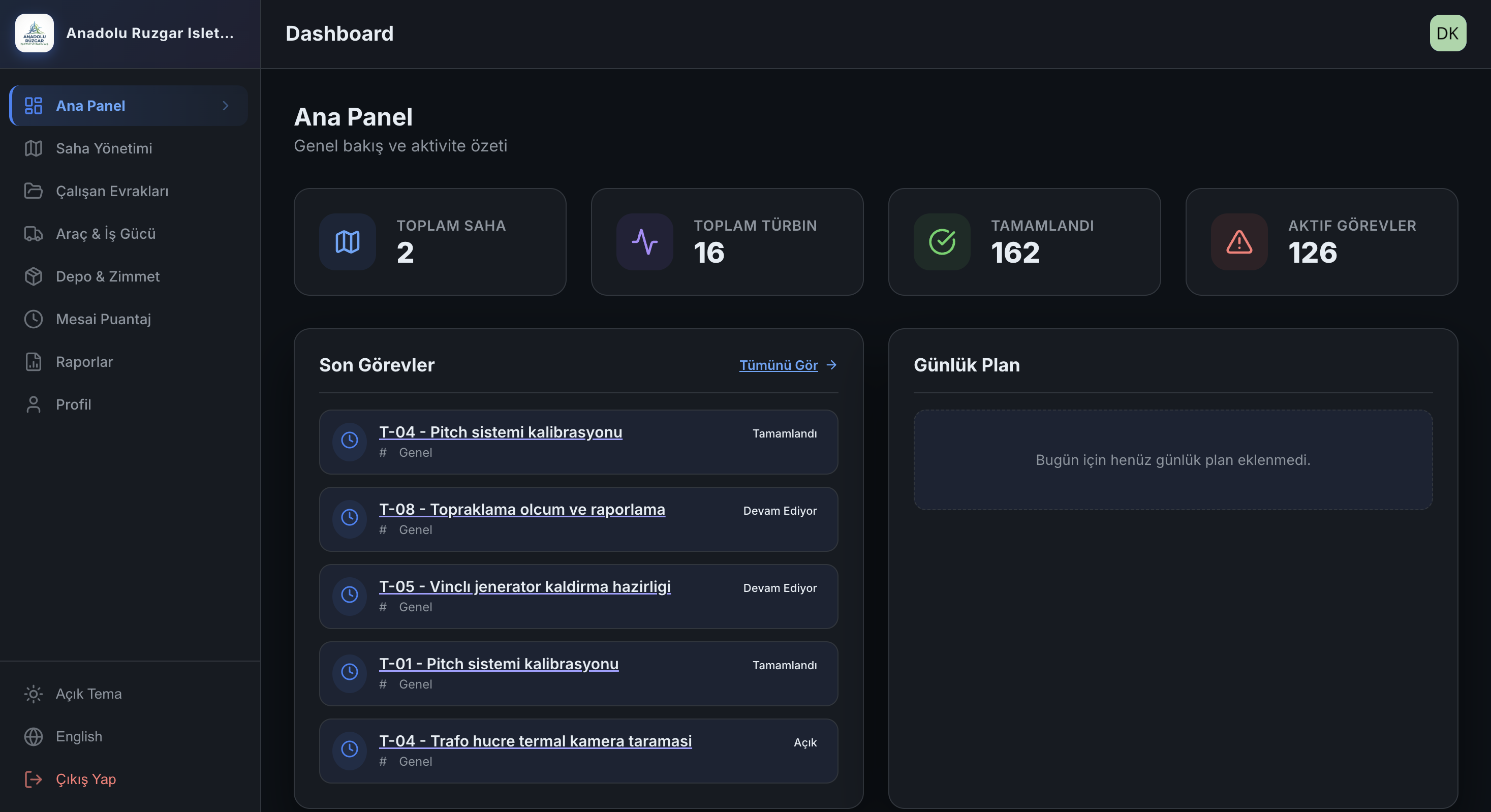
Site management
The site management screen keeps active sites, team assignments, and site-based operational visibility in the same panel.
What Not To Miss

Details that make a difference
in the sales conversation.

Many products talk about task tracking. What accelerates a customer’s decision are the second layers that actually touch the real difficulties in the field.

Offline-first field flow

The mobile app progresses with local record logic; it syncs when the connection returns, and conflicts become manageable.

Expiry-based tracking logic

Approaching calibration, inspection, and document expiry dates are visible via separate filters; risk doesn’t wait until the last day.

Photo-based handover and history

Vehicle transfers are recorded with mileage, notes, and inspection data; assignment disputes leave less room for interpretation.

Role-based operations chain

Site manager, project manager, HSE, team leader, and technician work in the same system with different permissions and responsibilities.

Encrypted sensitive fields and audit trail

Controlled storage logic for sensitive fields — especially salary data — makes operational data more reliably manageable.

Multi-language and updatable structure

TR, EN, DE, and CN support, alongside push notifications and OTA update capabilities, makes field deployments more flexible.

Operational Outcomes

The gain the customer feels
is stronger than a feature list.

Correct positioning wins by showing not what the software does, but which friction it removes on the customer’s side.

Centre makes faster decisions

What’s happening at which site today, who is actively working, and what is delayed — all visible from one panel.

Audit readiness becomes easier

Documents, assignments, and historical movements aren’t searched; they’re filtered and shown.

Field doesn’t lose data

Even in low-connectivity areas, record flow doesn’t break, so the workday doesn’t need to be rewritten.

Disputed handovers decrease

Because date, person, and note-based history forms on the vehicle, equipment, and task side, responsibility boundaries become clear.

Target Customer

This product is for teams experiencing
real operational intensity in the field.

TurbineDoc offers a stronger proposition not as a general task management tool for broad use, but for structures that know the field reality of wind energy operations.

EPC and construction firms Structures that want to bring multi-team coordination, documents, and site flows into one system during the installation phase.
O&M and maintenance teams Teams that continuously produce field data on the periodic service, quality, HSE, and equipment side.
Multi-site contractors Operations that need to see people, vehicle, and document flows centrally across more than one site.
HSE, quality, operations & HR working together Because the problem isn’t just a technical work order; it’s also compliance, expiry, assignment, and document management.
Contact

Consolidate your wind site operations into a single flow with TurbineDoc.

If your goal isn’t just digitisation, but making field, people, assignments, documents, and reporting processes manageable — the next step is matching the demo flow to your own site structure.

Request a Demo
Pricing

Simple, transparent pricing

Start free, scale as you grow.

Free

$0 / month

Starter for small teams.

  • 1 Turbine unit
  • 500 MB storage
  • Basic task tracking
  • iOS & Android
Start for Free
Most Popular

Pro

$499 / month

$299 / month40% Off

Full capacity for large operations.

  • Unlimited sites and turbines
  • 200 GB storage
  • Unlimited users
  • Daily work plan
  • Detailed field reports
  • Web portal access
  • Vehicle & workforce management
  • Employee documents module
  • Timesheet & overtime management
  • Priority support
Get Started Now
Download

Get started right away

Access TurbineDoc for free on iOS and Android devices. Account setup takes just minutes.